Introduction
The goal of client-side media is to provide the highest quality media processing to all WordPress sites. WordPress today relies on the web server – and image processing libraries like GD or Imagick – to handle image uploads. This approach depends entirely on the server environment – so not all users get the same experience. Client-side media processing is a new feature shipping in WordPress 7.1 that shifts image processing to the browser where it performs compression, resizing, format conversion, rotation, and “thumbnail” generation before uploading media to the server. Best in class media handling is now provided out of the box using modern web capabilities and native browser APIs.
Key benefits include:
- Consistent processing: All users get the same high-quality image processing powered by libvips via WebAssembly, regardless of their host or server. WordPress can ship new or updated library versions in any release, so users always get the latest improvements when they update.
- Reduced server load: Image processing is offloaded to the user’s device, freeing server resources.
- No PHP memory limits: Server-side image processing is often constrained by PHP’s memory limit, causing failures with large images.
- Faster downloads: libvips generally produces better-compressed JPEGs than GD/Imagick and supports all modern formats, so generated images are smaller and load faster.
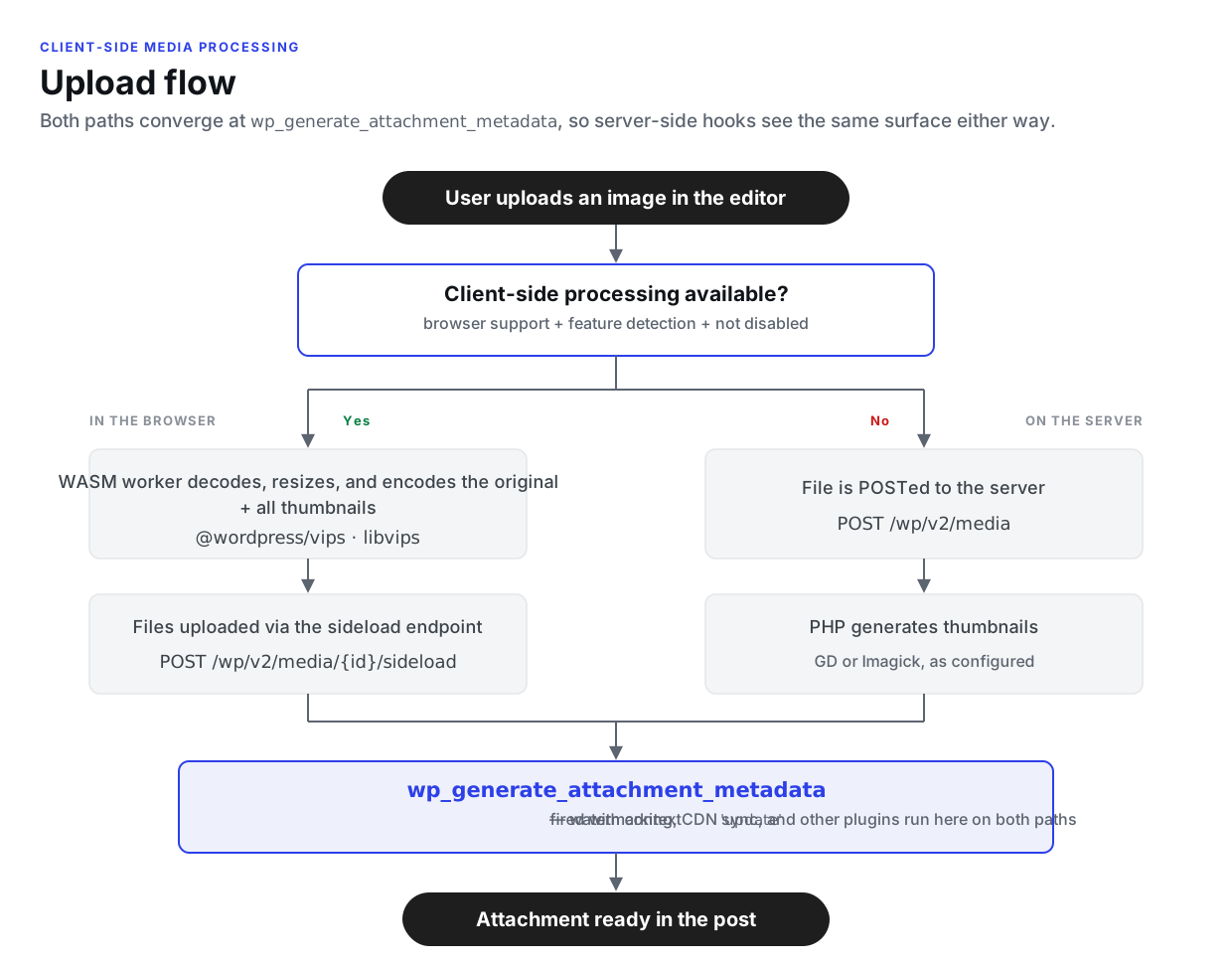
When client-side processing is not available (unsupported browser, insufficient device resources, or explicitly disabled), WordPress transparently falls back to traditional server-side processing with no user intervention required.
Upload flow
Both paths converge at wp_generate_attachment_metadata, so server-side plugins see the same lifecycle regardless of which path was taken (for a detailed comparison of which hooks fire on each path, see Hook firing: client path vs server path):
Architecture overview
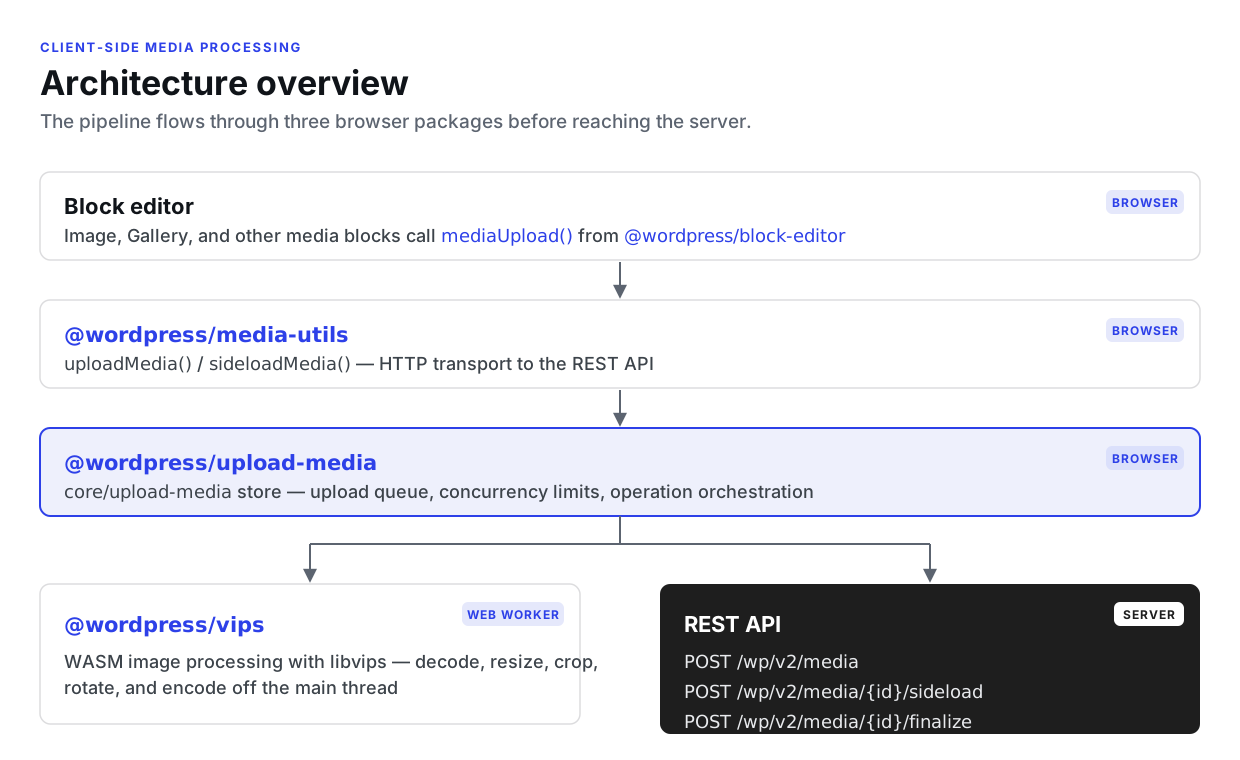
The client-side media processing pipeline flows through several layers:
Three-package split
Client-side media processing is split across three packages, each with a distinct responsibility:
@wordpress/upload-media — Queue and orchestration
The core/upload-media data store manages the upload queue and coordinates the processing pipeline. It:
- Maintains a queue of items with statuses (queued, processing, paused, uploaded, error).
- Enforces concurrency limits (max 5 concurrent uploads, max 2 concurrent image processing operations).
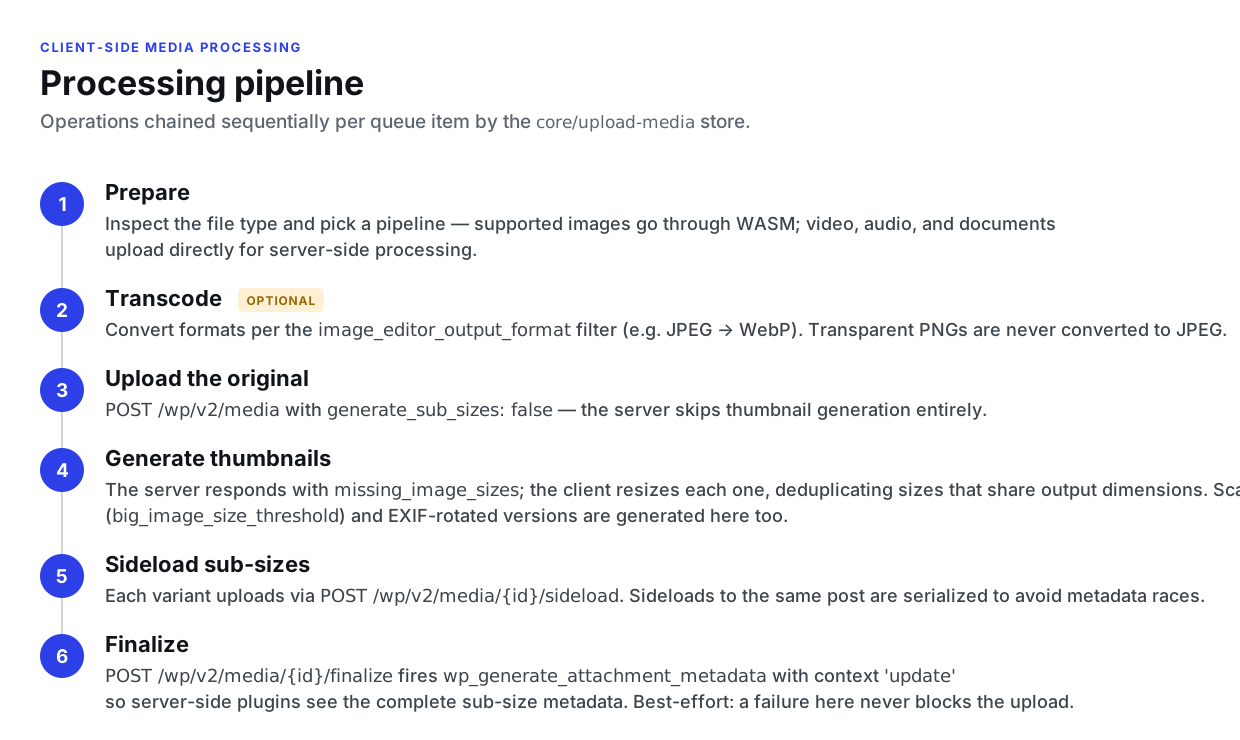
- Chains operations sequentially per item: prepare transcode upload thumbnail generation sideload finalize.
- Handles batch grouping, progress tracking, retry logic, and error handling. Failed network requests are retried automatically with exponential backoff and jitter (up to 4 total attempts) before an error is surfaced.
- Manages blob URLs for image previews and revokes them after use.
Key source files:
packages/upload-media/src/store/— Redux-like store with actions, selectors, and reducer.packages/upload-media/src/feature-detection.ts— Browser capability checks.
@wordpress/vips — WASM image processing
A JavaScript wrapper around wasm-vips (a WebAssembly compilation of libvips). It runs in a Web Worker to avoid blocking the main thread and provides:
- Format conversion (JPEG, PNG, WebP, AVIF, GIF).
- Resizing and cropping with smart crop support.
- EXIF orientation-based rotation.
- Transparency detection (to avoid converting transparent PNGs to JPEG).
- Compression with configurable quality (0–1, default
0.82).
Key source files:
packages/vips/src/index.ts— Core processing functions.packages/vips/src/worker.ts— Web Worker entry point dynamically imported by the loader.packages/vips/src/vips-worker.ts— Worker wrapper with lazy initialization.packages/vips/src/loader.ts— Minimal loader for WordPress script module discovery.
@wordpress/media-utils — HTTP transport
Provides the uploadMedia() and sideloadMedia() functions that handle the actual HTTP requests to the WordPress REST API. This package is responsible for file upload, sideload requests, and communicating server responses back to the upload store.
Processing pipeline
When a user uploads an image in the block editor, the following pipeline executes:
1. Prepare
The prepareItem() operation examines the file type and determines which operations to run. For images supported by the WASM processor, the full pipeline is used. For other file types (video, audio, documents), the file is uploaded directly to the server with standard server-side processing.
2. Transcode (optional)
If the site is configured to convert image formats (e.g., JPEG WebP via the image_editor_output_format filter), the transcodeImageItem() operation converts the image using @wordpress/vips. Special handling exists for PNGs with transparency — these are not converted to JPEG to preserve the alpha channel.
3. Upload original
The uploadItem() operation uploads the (optionally transcoded) image to the server via the REST API. The request includes generate_sub_sizes: false to tell the server not to generate thumbnails, since the client will handle that.
4. Thumbnail generation
After the upload completes, the server responds with missing_image_sizes — a list of thumbnail sizes that still need to be generated. The generateThumbnails() operation creates sideload items for each missing size.
Sizes are deduplicated by their effective output dimensions before processing. When a theme registers an image size with the same width/height/crop as a built-in size (for example, Twenty Eleven’s large matches WordPress core’s medium_large at 768×1024), the client generates one physical file and tells the server to register it under both names by passing an array to the sideload route’s image_size parameter. This matches how the server-side path handles duplicate dimensions and avoids producing extra files.
For images that exceed the big_image_size_threshold (default: 2560px), a scaled version is also generated and sideloaded. The unscaled original is what gets uploaded first (step 3); sub-size filenames derive from that original basename, and only the scaled full-size copy carries the -scaled suffix. This matches WordPress core’s wp_create_image_subsizes() naming.
If the original image requires EXIF rotation (orientation ≠ 1), a rotated version is generated and sideloaded as well.
5. Sideload sub-sizes
Each thumbnail is processed client-side (resize/crop optional format conversion) and then uploaded to the server via the sideload endpoint (POST /wp/v2/media/{id}/sideload). The server stores each sub-size in the attachment metadata, registering it under each size name supplied in image_size.
To prevent race conditions, sideload uploads to the same post are serialized — if one item is being sideloaded, other items targeting the same post are paused until the sideload completes.
6. Finalize
After all sideloads for an item complete, the finalizeItem() operation calls POST /wp/v2/media/{id}/finalize. This endpoint applies the wp_generate_attachment_metadata filter with context 'update' so server-side plugins (watermarking, CDN sync, custom metadata processing, etc.) can post-process the attachment after all sub-sizes are written.
The filter was already fired once with context 'create' during the initial upload, so plugins see two passes per client-side upload. This double-fire pattern matches how WordPress handles big-image uploads on the server, where sub-size generation is deferred and triggers a second 'update' pass.
The finalize step uses a gate: if any child sideloads are still pending, the operation waits. Once the last sideload completes, it triggers the parent item’s pending Finalize operation.
If the finalize request fails, the error is logged but the upload is still considered successful — finalization is best-effort so that a plugin failure doesn’t block the user’s upload.
Image quality resolution
Client-side encoding honors the same PHP filters that govern server-side image quality: wp_editor_set_quality and, for JPEG output, the still-supported jpeg_quality.
When an upload completes, the attachment REST response carries a size-aware image_quality field. The server resolves the output MIME type the same way WP_Image_Editor::set_quality() does (after image_editor_output_format), then applies the filters with the full image dimensions for default and each registered sub-size’s dimensions, reporting a size under sizes only when its filtered value diverges from default:
"image_quality": {
    "default": 82,
    "sizes": { "thumbnail": 60 }
}
The client converts the 1–100 WordPress scale to the 0–1 scale the vips worker expects and applies the per-size value during sub-size resize and transcode. When the field is absent (an older server), the client falls back to the hardcoded default of 0.82.
Hook firing: client path vs server path
Moving image processing into the browser changes where some server-side hooks fire, and whether they fire at all. The overall contract is preserved, though: the client path fires all of the core upload-lifecycle hooks a server-side upload fires, in the same relative order. The findings below come from a complete audit of every hook fired during upload, run for all supported image types on both paths (#80210).
A client-side upload reaches the server as a series of REST requests, and each request fires its own hooks:
- Create (
POST /wp/v2/media, the original file): the standard upload surface fires as usual, includingwp_handle_upload_prefilter,wp_check_filetype_and_ext,wp_handle_upload,add_attachment,rest_insert_attachment/rest_after_insert_attachment,wp_read_image_metadata, andwp_generate_attachment_metadatawith context'create'(before any client-generated sub-sizes exist). - Sideload (
POST /wp/v2/media/{id}/sideload, once per generated file): each client-generated sub-size goes through the standard upload handler, sowp_handle_upload_prefilterandwp_handle_uploadfire once per file, with the final file path. Companion files (the HEIC original, the animated GIF’s video and poster) go through the same endpoint and fire the same per-file hooks. The REST upload paths always use theuploadaction, sowp_handle_sideload_prefilterdoes not fire on either path. - Finalize (
POST /wp/v2/media/{id}/finalize):wp_generate_attachment_metadatafires a second time with context'update'and the completesizesarray – see Finalize.
Filters that fire in a new role
Because encoding happens in the browser, several image-processing filters are no longer consulted while an image file is being written. They still fire, and their values still control the pipeline, but they are consumed when the server computes the settings sent to the client (the REST index and the upload response) rather than during encoding:
| Filter | Where the value is used |
|---|---|
image_editor_output_format |
Builds the per-MIME output format map applied by the client. |
wp_editor_set_quality / jpeg_quality |
Resolved per registered size into the upload response’s image_quality field. |
big_image_size_threshold |
Shipped to the client via the REST index; scaling happens in the browser. |
image_save_progressive |
Read at upload time; the client applies progressive/interlaced encoding accordingly. |
image_strip_meta |
Exported on the REST index; when it returns false, the client keeps all metadata on generated images. |
image_max_bit_depth |
Exported on the REST index; the client caps the output bit depth of generated images accordingly. |
intermediate_image_sizes / intermediate_image_sizes_advanced |
Consumed when computing registered sizes and missing_image_sizes. |
Callbacks on these filters keep working, but they run at settings-computation time instead of once per encode, so they may see different argument values or invocation counts than on the server path.
Hooks that do not fire on the client path
Three hooks are intrinsic to server-side image editing and never fire on the client path:
| Hook | Why it cannot fire | What to use instead |
|---|---|---|
wp_image_editors |
No server-side WP_Image_Editor is instantiated. |
Sites that depend on a custom image editor implementation can disable the feature via wp_client_side_media_processing_enabled. |
image_make_intermediate_size |
Sub-sizes are not generated by a server-side editor. | wp_handle_upload fires once per sideloaded sub-size file, and the finalize pass of wp_generate_attachment_metadata delivers the complete metadata. |
image_memory_limit |
PHP memory is not involved in image processing. | Not needed – processing happens in the browser. |
These are intentionally left silent: firing them artificially would mislead plugins into thinking they can alter files that were already encoded in the browser.
EXIF rotation
wp_image_maybe_exif_rotate still fires on the create request for images that carry an EXIF orientation, but the media endpoint forces its value to false while handling a client-side upload: the client reads the orientation from the exif_orientation response field and applies the rotation itself (see Thumbnail generation).
WASM module loading
The WASM worker bundle is loaded lazily — only when the first image needs processing:
- Loader discovery:
@wordpress/vips/loaderis a thin module that dynamically imports@wordpress/vips/worker, so WordPress’s script module system can discover the dependency without pulling the WASM binary into the initial editor bundle. -
Worker creation: A Web Worker is spawned from an inline blob URL on first use.
vips.wasmandvips-heif.wasmare inlined as base64 data URLs at build time, avoiding separate file downloads and WASM MIME-type issues. -
Single instance:
getVips()caches a promise so concurrent first-time calls share one initialization. The worker stays alive across uploads and is terminated byterminateVipsWorker()when the upload queue empties or when it is recycled (see Memory management below). -
Memory management: WASM linear memory can only grow, never shrink, so the pipeline actively limits how much it accumulates:
- The libvips operation cache is disabled at startup (
Cache.max(0)). libvips otherwise caches the results of previous operations, which grows WASM memory unbounded across a batch of uploads and can trigger out-of-memory crashes. - The worker is recycled (terminated and recreated on next use) after every 50 completed vips operations, counting both successes and failures so a burst of failures can’t bypass the budget. Recycling is deferred while any operation is still in flight so an active worker is never killed mid-operation.
- Emscripten’s
setAutoDeleteLater(true)handles automatic cleanup, and each operation also runs a manual cleanup after completion. Operations are tracked in aninProgressOperationsset so they can be cancelled mid-flight via a progress-callback kill switch.
- The libvips operation cache is disabled at startup (
- Batch thumbnail generation:
batchResizeImage()decodes the source image once withnewFromBuffer()and callsimage.copyMemory()to materialize the pixels in WASM memory. Each sub-size is then generated bythumbnailImage()against the in-memory copy and written directly to the output format.
Cross-origin isolation
Client-side media processing requires SharedArrayBuffer for WASM threading, which browsers only expose in cross-origin isolated contexts.
PHP headers
WordPress sends the Document-Isolation-Policy (DIP) header on block editor screens for Chromium 137+:
Document-Isolation-Policy: isolate-and-credentialless
This header provides per-document cross-origin isolation which is required to use the SharedArrayBuffer capability. Client-side media uses this capability to run the processing in a separate worker thread, which improves performance and avoids blocking the main thread during image processing.
The header is set via gutenberg_start_cross_origin_isolation_output_buffer() (in lib/media/load.php), which uses PHP output buffering on load-post.php, load-post-new.php, load-site-editor.php, and load-widgets.php screens. DIP is skipped on admin pages with an action parameter other than edit to avoid conflicts with page builders that rely on same-origin iframe access.
The gutenberg_use_document_isolation_policy filter can be used to control whether DIP is applied. Disabling DIP will also disable client-side media processing, since the WASM worker cannot run without SharedArrayBuffer.
HTML attribute injection
Cross-origin isolation requires that cross-origin resources include proper CORS attributes. WordPress handles this at two levels:
Server-side (PHP output buffer): The wp_add_crossorigin_attributes() function uses WP_HTML_Tag_Processor to add crossorigin="anonymous" to <audio>, <link>, <script>, <video>, and <source> tags that load cross-origin URLs.
Client-side (JavaScript MutationObserver): A MutationObserver in packages/block-editor/src/hooks/cross-origin-isolation.js monitors the DOM for dynamically added elements and adds crossorigin="anonymous" attributes at runtime.
Note:
<img>is intentionally excluded from the mutated-element list. Document-Isolation-Policy doesn’t require<img>resources to be CORS-enabled, and forcingcrossorigin="anonymous"on cross-origin images would break previews for the common case of an Image block linking to a third-party URL without CORS headers.
External images
Importing an external image into the media library (the Image block’s “Upload to Media Library” action and the pre-publish “External media” panel) does not fetch the image bytes in the browser. A browser cross-origin fetch is subject to CORS — and fails outright in a credentialless isolated document — so the editor instead POSTs the image URL to POST /wp/v2/media (the url parameter) and the server downloads and sideloads the file, the same primitive behind core’s media_sideload_image(). The editor exposes this path through the mediaSideloadFromUrl block editor setting.
Browser support
Client-side media processing is limited to Chromium-based browsers that support Document-Isolation-Policy:
| Browser | Minimum Version | Notes |
|---|---|---|
| Chrome | 137+ | Full support via Document-Isolation-Policy. |
| Edge | 137+ | Full support via Document-Isolation-Policy. |
| Firefox | — | Not supported. |
| Safari | — | Not supported for the WASM pipeline; the HEIC canvas fallback still works. |
Browsers that do not support DIP fall back automatically to server-side processing.
Feature detection
Before enabling client-side processing, the browser’s capabilities are checked in packages/upload-media/src/feature-detection.ts. All checks must pass; failure at any point causes a transparent fallback to server-side processing.
| Check | Threshold | Reason |
|---|---|---|
| WebAssembly available | — | Required for wasm-vips |
| SharedArrayBuffer available | — | Required for WASM threading (implies Document-Isolation-Policy is active) |
| Web Worker available | — | Required for the off-main-thread vips worker |
| Device memory | > 2 GB | WASM image processing can hold the full image in memory plus working buffers; very low-memory devices can OOM |
| Hardware concurrency | ≥ 2 CPU cores | WASM workers can monopolize a core for tens of seconds during encode |
| Network connection | not 2g/slow-2g, no Save-Data |
Avoid the ~13 MB worker download on connections that can’t bear it |
CSP allows blob: workers |
— | Required for inline worker creation; verified by attempting to construct a worker from a blob URL |
The PHP-side feature flag (wp_client_side_media_processing_enabled filter) is also checked before any JavaScript feature detection runs. The Document-Isolation-Policy header is only sent on Chromium 137+, which short-circuits the JavaScript path on browsers that don’t support cross-origin isolation through DIP.
A separate isHeicCanvasSupported() check (createImageBitmap + OffscreenCanvas) gates the HEIC fallback path. This runs independently of full VIPS support so Safari (which can’t run the WASM pipeline but can decode HEIC natively) can still handle iPhone photos in the browser.
Supported formats
The following formats are processed in the WASM/vips pipeline (CLIENT_SIDE_SUPPORTED_MIME_TYPES):
| Format | Read | Write | Transparency | Animation | Progressive/Interlace |
|---|---|---|---|---|---|
| JPEG | Yes | Yes | No | No | Yes |
| PNG | Yes | Yes | Yes | No | Yes |
| WebP | Yes | Yes | Yes | Yes | No |
| AVIF | Yes | Yes | Yes | No | No |
| GIF | Yes | Yes | No | Yes | Yes |
Notes:
– AVIF encoding uses effort: 2 to balance encoding speed with quality.
– High-bit-depth AVIF sources (10- or 12-bit, common for HDR photos) keep their bit depth in generated sub-sizes instead of being silently truncated to 8-bit.
– Animated GIF and WebP images preserve all frames during processing in the vips pipeline.
– Opaque animated GIFs are additionally converted to a companion video (MP4/WebM) outside the vips pipeline — see Animated GIF to video conversion below.
– PNG-to-JPEG conversion is skipped when the PNG has transparency.
– AVIF uploads bypass the server’s wp_prevent_unsupported_mime_type_uploads check when generate_sub_sizes=false, so a host without server-side AVIF support can still accept client-processed AVIF files.
– UltraHDR JPEGs keep their HDR gain maps through sub-size generation — see UltraHDR JPEG below.
UltraHDR JPEG
UltraHDR JPEGs embed an ISO 21496-1 gain map alongside a standard SDR base image. Gain maps are a new, backwards-compatible way of adding HDR data to SDR images, supported by Google (UltraHDR), Apple (Adaptive HDR), and Adobe (Camera Raw, Lightroom, and Photoshop). SDR displays simply show the base image, while HDR displays apply the gain map to recover the full dynamic range. The pipeline detects gain maps in JPEG files regardless of which camera or app produced them.
When a JPEG is uploaded, the client probes it for a gain map (getUltraHdrInfo() in @wordpress/vips, backed by libvips’s uhdrload loader). When a gain map is found:
- The original uploads unmodified. No transcoding or re-encoding touches the main file, so the full HDR data reaches the media library intact.
- Sub-sizes keep their gain maps. Resize operations route through libvips’s
uhdrload/uhdrsavepipeline, which decodes the gain map alongside the base image. The gain map is scaled and cropped in lockstep with the base image and saved withkeep: 'icc|gainmap', so every generated thumbnail is itself a valid UltraHDR JPEG. - Format conversion is skipped. The
image_editor_output_formatmapping is not applied to UltraHDR sources — converting to a different codec would strip the gain map.
The probe is skipped for images routed to the server by the large-image gate, since only the client-side resize path preserves gain maps.
HEIC/HEIF
HEIC/HEIF is handled via a canvas-based fallback path rather than wasm-vips, since the HEVC codec used by HEIC has patent/licensing restrictions that prevent shipping a decoder in the browser bundle.
When a HEIC file is uploaded, the client tries three decoding strategies in order:
createImageBitmap()— Works in Safari (which can decode HEIC via macOS platform codecs) and any future browser that adds HEIC to its image pipeline.- OS-licensed image decoders via
HTMLImageElementOffscreenCanvas— A second-tier path for browsers with platform HEIC support. - HEIC container parsing + WebCodecs
VideoDecoder— Chromium 107+ can decode HEVC bitstreams via the platform codec (VideoToolbox on macOS, the Microsoft HEVC Video Extension on Windows) even without HEIC image support. The client parses the ISOBMFF container, extracts the HEVC tiles, and re-assembles them on a canvas.
The decoded image is exported as a JPEG (.jpg, MIME image/jpeg) and uploaded with the original HEIC kept as a companion file in $metadata['original']. The server is responsible for sub-size generation in this path (generate_sub_sizes: true, convert_format: true), so the image_editor_output_format mapping is preserved for the JPEG sub-sizes.
Animated GIF to video conversion
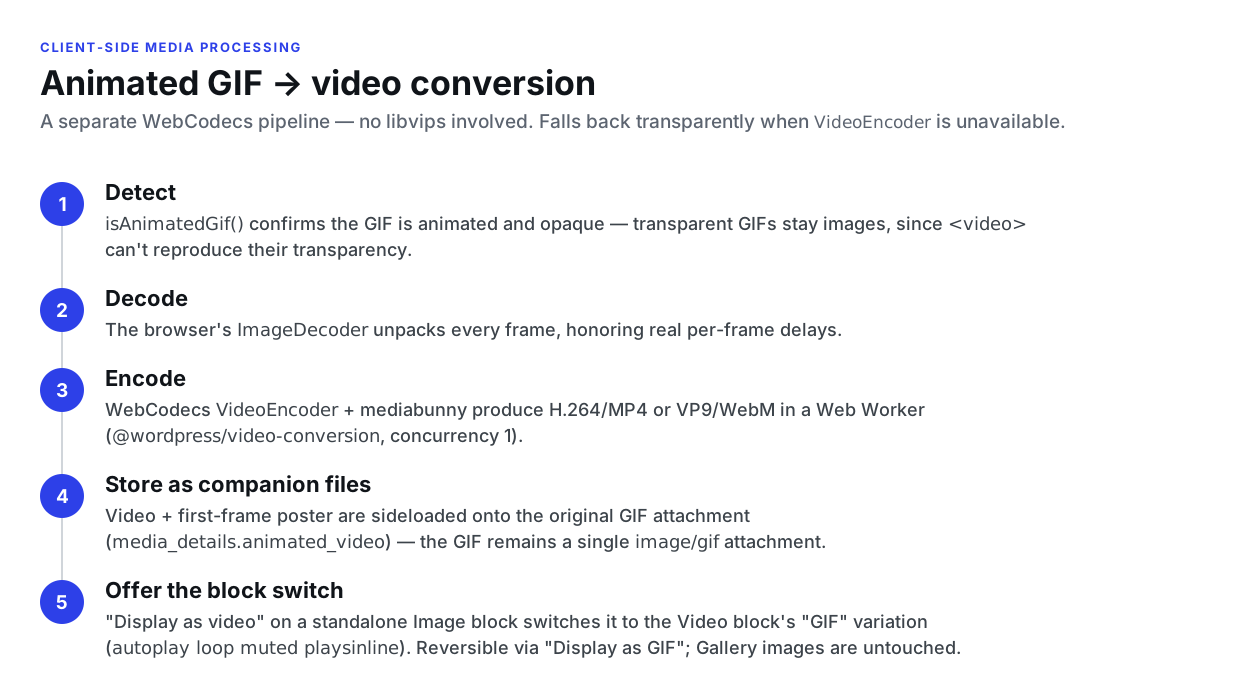
Animated GIFs are large and inefficient compared to modern video. When an opaque animated GIF is uploaded, the client converts it to an MP4 (or WebM) video so it plays like the original GIF but downloads far less data. This is a distinct pipeline from the wasm-vips image path described above — it uses the browser’s native WebCodecs APIs plus the mediabunny library rather than libvips.
@wordpress/video-conversion package
Conversion lives in a dedicated package that mirrors the @wordpress/vips worker pattern: a Web Worker is bundled with mediabunny and exposed to the main thread through a Comlink-style proxy, so the memory-intensive encode runs off the main thread.
Key source files:
packages/video-conversion/src/index.ts— TheconvertGifToVideo()frame pipeline.packages/video-conversion/src/worker.ts— Worker API surface (Comlink endpoint).packages/video-conversion/src/video-conversion-worker.ts— Worker host wrapper.packages/video-conversion/src/loader.ts— Thin loader for WordPress script-module discovery.
Conversion pipeline
- Detection.
isAnimatedGif()(inpackages/upload-media/src/utils.ts) inspects the GIF89a Graphic Control Extension blocks to confirm the file is actually animated. Transparent GIFs are excluded — a<video>cannot reproduce GIF transparency — so they upload as a normal image with no companion. - Decode. The browser’s
ImageDecoderdecodes each GIF frame, honoring the real per-framedelayvalues (defaulting to the GIF spec’s 100ms / 10fps when a frame reports none). - Encode. Each decoded
VideoFrameis fed to mediabunny’sVideoSampleSourceand encoded via the WebCodecsVideoEncoder—avc(H.264) into anMp4OutputFormat, orvp9into aWebMOutputFormat. Output dimensions are forced even, as the codecs require. - Store as companion files. The converted video and a static first-frame poster are sideloaded as companion files of the original GIF attachment (the same model as the HEIC original), recorded in
media_details.animated_videoandmedia_details.animated_video_poster. The GIF remains a singleimage/gifattachment — the video and poster are never separate attachments.
The operation is wired into the upload store as OperationType.TranscodeGif with its own transcodeGifItem() action, chained from prepareItem(). It runs with a video processing concurrency limit of 1 (tracked by getActiveVideoProcessingCount()), independent of the image-processing limit, because the encode is memory-intensive.
Editor block switch
Unlike HEIC (which only swaps the stored file), the GIFvideo conversion offers to change the block in the editor — there is no render-time PHP filter.
- A “GIF” variation of the Video block.
core/videodeclares two variations, “Video” and “GIF”, distinguished purely by their attribute combination — the GIF variation is! controls && loop && autoplay && muted && playsInline(isGifVariation()inpackages/block-library/src/video/variations.js). No new block attribute is introduced. The variation is scoped toblock+transform(not the inserter), since it represents a converted GIF rather than something inserted directly. Its editor preview autoplays, loops, and is muted, so it behaves like the original GIF. - Opt-in switch. The block is never replaced automatically. Once the companion video is available, a standalone
core/imageblock shows a “Display as video” toolbar control (AnimatedGifConvertControlinpackages/block-library/src/image/animated-gif-convert-control.js) that replaces it with the Video block’s GIF variation playing the companion. The control is not offered inside a Gallery (a gallery only accepts image blocks); Media & Text and Cover are unaffected because their media is not acore/imageblock. A.gif-URL gate prevents non-GIF images from triggering an attachment fetch just to look for a companion. - Fully reversible. A “Display as GIF” toolbar control on the GIF video block switches it back to the original
core/image, so the round-trip works in both directions. - Native front-end rendering. Because the converted block is a real
core/video, it serializes a native<video autoplay loop muted playsinline poster>and renders on the front end with no filtering.
Browser support and fallback
The conversion path requires WebCodecs encode, which is gated on typeof ImageDecoder !== 'undefined' && typeof VideoEncoder !== 'undefined' at prepareItem time, plus a per-codec canEncodeVideo() check. When WebCodecs is unavailable (for example Firefox, which lacks VideoEncoder), the worker returns an Unsupported error and the original GIF is left in the queue to upload as-is. Like the rest of client-side media, the fallback is transparent.
PHP
The PHP footprint is minimal (lib/media/animated-gif-to-video.php plus an enqueue and a sideload allowance):
- Enqueues the
@wordpress/video-conversion/loaderscript module in the editor (lib/client-assets.php). - Allows the converted video and poster as valid sideload sizes on the attachment (
class-gutenberg-rest-attachments-controller.php). - Cleans up the sideloaded companion video and poster when their attachment is deleted (
gutenberg_delete_animated_gif_video()on thedelete_attachmenthook), since core’swp_delete_attachment_files()does not know about them. Deletion is delegated towp_delete_file_from_directory(), scoped to the uploads directory.
Fallback behavior
Client-side media processing is designed with transparent fallback. When the browser does not support WASM processing — or when the feature is disabled — uploads proceed through the traditional server-side path:
- The file is uploaded to
POST /wp/v2/mediawith default parameters. - The server generates thumbnails using
wp_generate_attachment_metadata(). - Server-side image processing uses GD or Imagick as configured.
- The user experience is identical — no errors or additional prompts.
The fallback is automatic and requires no configuration.
REST API extensions
Client-side media processing extends the WordPress REST API in several ways:
New request parameters
| Parameter | Endpoint | Type | Default | Description |
|---|---|---|---|---|
generate_sub_sizes |
POST /wp/v2/media, POST /wp/v2/media/{id}/sideload |
boolean | true |
When false, the server skips thumbnail generation. The client generates and sideloads thumbnails itself. |
convert_format |
POST /wp/v2/media, POST /wp/v2/media/{id}/sideload |
boolean | true |
When false, the server skips format conversion via the image_editor_output_format filter. |
replace_file |
POST /wp/v2/media/{id}/sideload |
boolean | false |
When true, replaces the attachment’s main file with the sideloaded file, updating the MIME type and metadata and deleting the old file. Used for the HEIC JPEG companion path. |
image_size |
POST /wp/v2/media/{id}/sideload |
string | string[] | — | The image size name (e.g., thumbnail, medium, scaled, original). An array of names registers a single physical file under multiple sizes that share dimensions. |
url |
POST /wp/v2/media |
string | — | When present (instead of a file body), the server downloads the remote image with download_url() and sideloads it with media_handle_sideload(). Used to import external images without a browser cross-origin fetch — see External images below. |
When generate_sub_sizes is false, the following server-side filters are also temporarily disabled:
– intermediate_image_sizes_advanced — Prevents sub-size generation.
– fallback_intermediate_image_sizes — Prevents fallback size generation.
– wp_image_maybe_exif_rotate — Prevents server-side EXIF rotation (client handles it).
– big_image_size_threshold — Prevents server-side big image scaling (client handles it).
New response fields
| Field | Type | Description |
|---|---|---|
exif_orientation |
integer | EXIF orientation value (1–8). A value other than 1 indicates the image needs rotation. |
missing_image_sizes |
array | List of registered image size names that have not yet been generated for this attachment. |
filename |
string | Original attachment file name. |
filesize |
integer | Attachment file size in bytes. |
image_quality |
object | Size-aware encode quality (1–100) from the wp_editor_set_quality filter: { default, sizes }, where sizes lists only the registered sizes whose filtered value diverges from default. See Image quality resolution. |
Sideload endpoint
POST /wp/v2/media/{id}/sideload
Uploads a processed image variant (thumbnail, scaled version, or rotated original) to an existing attachment. The image_size parameter specifies which variant is being uploaded and accepts any registered image size name, plus original and scaled.
Before writing the file to the attachment metadata, the endpoint validates that the uploaded dimensions are appropriate for the declared image_size. Every size must have positive dimensions; an original upload must match the attachment’s stored original dimensions exactly; and a regular registered size must not exceed that size’s registered width or height (with a 1px tolerance for rounding). The scaled, full, and original-heic sizes are exempt from the maximum-dimension check. When validation fails, the uploaded file is deleted and the request returns a 400 error: rest_upload_dimension_mismatch, rest_upload_invalid_dimensions, or rest_upload_unknown_size. This prevents a mis-sized file (for example, a full-resolution image sideloaded under the thumbnail size name) from corrupting the attachment’s responsive image set.
Finalize endpoint
POST /wp/v2/media/{id}/finalize
Applies the wp_generate_attachment_metadata filter with context 'update' after all client-side operations (upload, thumbnail generation, sideloads) are complete. The filter was already fired once with 'create' during the initial upload — this second pass is what lets server-side plugins (watermarking, CDN sync, custom image sizes) see the full sub-size metadata.
The endpoint requires edit_post and upload_files capabilities. It reads the existing attachment metadata, applies the filter, saves the result, and returns the refreshed attachment record. The editor consumes this response to update the block’s stored media URL to the final server-side file, for example the -scaled copy generated for images that exceed big_image_size_threshold. Without this refresh the block would keep the unscaled original’s URL, which would prevent wp_calculate_image_srcset() from matching the sub-size files and emit no srcset on the front end.
REST index media settings
When client-side processing is enabled, the REST API root index (GET /) is augmented (for users with upload_files capability) with:
image_sizes— All registered image sizes with dimensions and crop settings, derived fromwp_get_registered_image_subsizes().image_size_threshold— The currentbig_image_size_thresholdfilter value.image_strip_meta— The currentimage_strip_metafilter value. Whenfalse, the client keeps all metadata (EXIF, XMP, IPTC) on generated images instead of stripping everything but color profiles (and HDR gain maps).image_max_bit_depth— The currentimage_max_bit_depthfilter value. Caps the bit depth of client-generated images; relevant for high-bit-depth AVIF sources.
Other server-side filters (image_editor_output_format, image_save_progressive) are read at upload time on the server rather than exposed via the index. The set of MIME types eligible for client-side processing is fixed at CLIENT_SIDE_SUPPORTED_MIME_TYPES (JPEG, PNG, GIF, WebP, AVIF) — there is no public filter for this list.
Concurrency
The upload store enforces two separate concurrency limits to balance performance and resource usage:
| Limit | Default | Reason |
|---|---|---|
| Max concurrent uploads | 5 | Uploads are network-bound and can run in parallel. |
| Max concurrent image processing operations | 2 | WASM image processing is memory-intensive. Running too many operations simultaneously risks out-of-memory crashes. |
When a concurrency limit is reached, new items wait in the queue. As operations complete, pending items are automatically dequeued and processed.
Additionally, sideload uploads to the same WordPress post are serialized to prevent race conditions in attachment metadata updates. If one sideload is in progress for a post, other sideloads targeting the same post are paused until the first completes.
Upload progress
While uploads are in flight, the editor shows a snackbar with batch progress (UploadProgressSnackbar in @wordpress/editor). The component is a controller that manages a notice through the notices store, so it positions and stacks with every other editor snackbar. It reads from two sources so progress is reported on both paths:
- The
core/upload-mediaqueue for client-side processing, counting only original user-uploaded files (generated sub-sizes and thumbnails are ignored). - An editor-local tracker populated by the editor’s
mediaUploadwrapper for the traditional server-side path.
A spinner accompanies the text while uploads run; when the last upload finishes it briefly becomes a checkmark before the snackbar dismisses. For accessibility, wp.a11y.speak() announces once when uploads start and once when they complete, avoiding per-tick chatter.
Post-save locking
While uploads are in flight, the editor takes a post-saving lock so the user can’t publish or save a draft that references attachments which haven’t finished sideloading. Both the legacy upload path and the client-side path share this behavior:
useUploadSaveLockwatches thecore/upload-mediastore and dispatcheslockPostSaving/unlockPostSavingagainst the editor store as items enter and leave the queue.- The legacy (
uploadMedia-only) path also locks viaUploadSaveLockWrapper, which counts active uploads instead of tracking a queue.
The Save Draft button, Publish button, and Ctrl/Cmd+S shortcut all check isPostSavingLocked(). The lock releases when all items are uploaded or any in-flight item is cancelled.
See also
- Client-side media processing how-to guide — practical guidance for plugin and theme developers (disabling, customizing, and debugging the feature).
- Editor filters reference: Client-side media processing — full filter and REST API parameter reference.