May has been a busy month on the Gutenberg front. There’s a lot to dig into, from early work on a new content types system to a handful of block fixes and improvements that will affect how themes style and structure their layouts. As always, the monthly roundup is here to help you get caught up.
WordPress 7.0 is also approaching quickly. The updated release schedule puts the final release on May 20, 2026, following a cycle that saw an extension from the original April date to allow more time for architectural work. RC3 is out now—if you haven’t tested your plugins and themes against 7.0 yet, now is the time to do so.
The headline news going into the final stretch is that real-time collaboration (RTC) will not ship in 7.0. The feature has been removed from the release due to concerns around surface area, race conditions, server load, and memory efficiency, with recurring bugs surfacing through fuzz testing. The team has been clear that RTC remains a priority—work will continue toward a future release—but it won’t be part of 7.0.
But let’s get into the new stuff. As usual, when testing features mentioned in these What’s new? posts, ensure that you’re running WordPress trunk and the latest version of the Gutenberg plugin. You can also test the latest updates via Playground.
Table of Contents
Highlights
Content types system takes shape

One of the more ambitious features underway is the Content Types experiment. This is still in early stages and worth bookmarking as something to follow. It represents the kind of longer-horizon work that sets the direction for where WordPress is headed. Not to mention, content type management in Core has been a long-requested feature, going back until at least the introduction of custom post types in WordPress 3.0. The tracking issue is a good read if you want to get a sense of what’s being explored.
Revisions panel for templates, template parts, and patterns
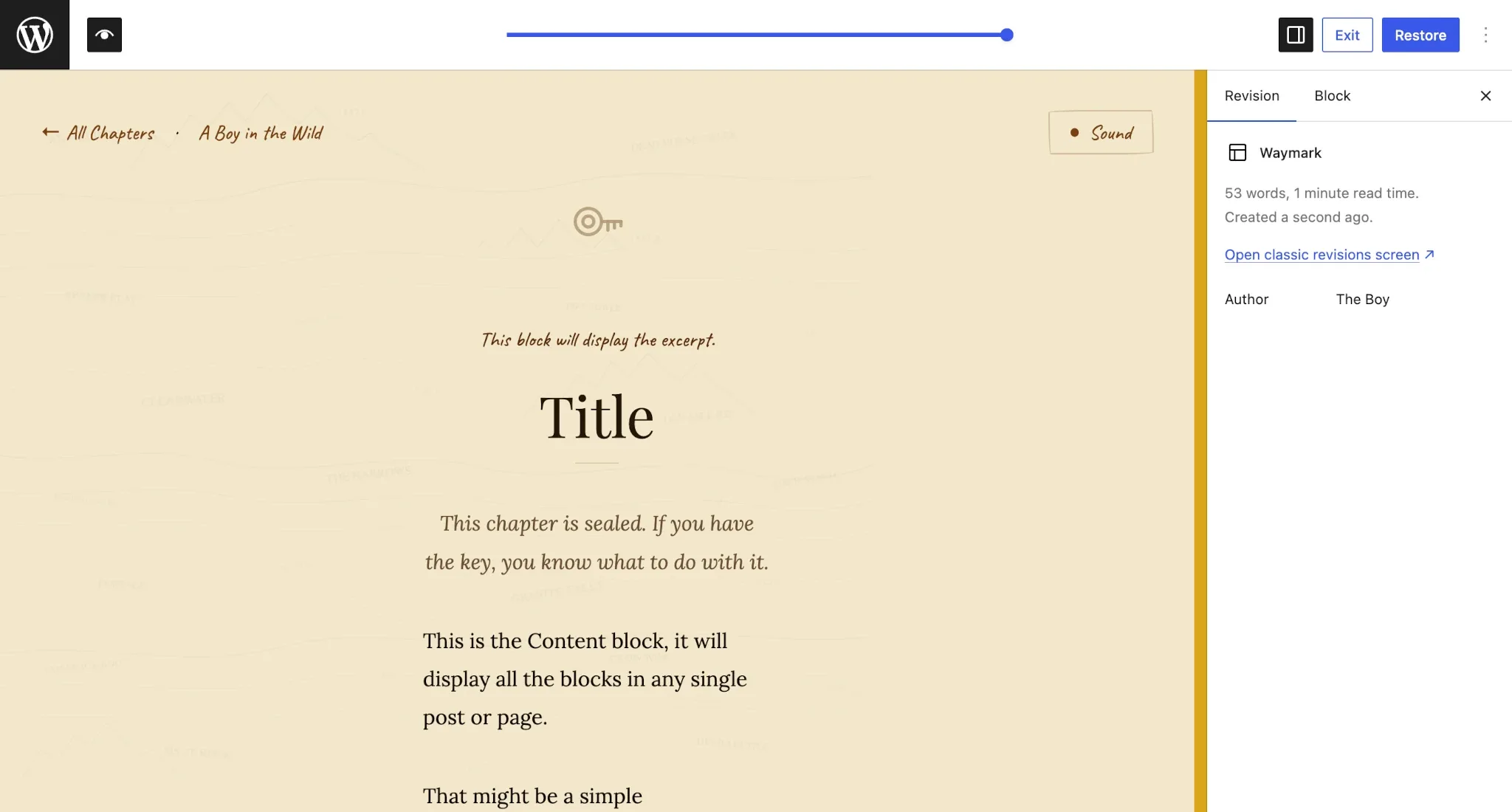
The revisions panel has now been extended to templates, template parts, and patterns. This is a meaningful improvement for anyone managing complex site structures, making it much easier to track changes over time and roll back to earlier versions when needed. It also brings these editor entities in line with the revision experience of editing posts.
New wordpress/grid package
A brand new @wordpress/grid package has been added to Gutenberg. This package is aimed at providing a consistent, standardized set of tools for building grid-based interfaces within WordPress. If you’re building plugin UIs or extending the editor with complex layouts, this is worth keeping an eye on as it matures.
Plugins & Tools
Guidelines CPT renamed and refined
There has been a cluster of related work around the Guidelines custom post type that is worth following collectively. First, the CPT was renamed from “content guidelines” to “guidelines”, with corresponding updates to the slug, classes, and routes also landing separately. The CPT has also been made type-aware, so it can adapt its behavior depending on the context in which it’s used.
Additional work in this area includes improvements to the guideline revision UX, the registration of a new wp_guideline_type taxonomy, and the extraction of initial public API methods. The singleton REST API has also been split into a dedicated /content-guidelines route, and the actions section and import/export workflow have been updated.
If you’re building tools around editorial workflows or content governance, the Guidelines CPT experiment is the area to watch. You can test it via Playground.
REST API updates
The Templates and Template Parts REST API endpoints have been updated to include a date field. This is a small but useful addition if you’re querying these endpoints and need to sort or filter by creation or modification date.
Widget types data layer
A widget-types data layer has been added to the Widgets module. This brings widget management more in line with the data patterns used elsewhere in Gutenberg, and should make it easier to work with widget data programmatically going forward.
Strip per-block custom CSS for users without edit_css
Users who lack the edit_css capability will no longer have their per-block custom CSS inadvertently preserved on save. If you’re building multi-user workflows or managing contributor roles, this is worth being aware of—per-block CSS is now properly gated by capability on save, consistent with how custom CSS is handled elsewhere.
HEIC-to-JPEG conversion now uses .jpg extension
When a HEIC image (common on Apple devices) is converted to JPEG on the client side before upload, the resulting file now correctly carries a .jpg extension rather than retaining the .heic extension. If you have any code that inspects file extensions on uploaded media, this change brings the behavior in line with what you’d expect.
I18N: Script module translation polyfill for WordPress < 7.0
A polyfill has been added to ensure that script module translations load correctly on sites running WordPress versions prior to 7.0. If you’re distributing plugins that target a broad range of WordPress installs and use script modules with translations, this broadens your backwards compatibility without any changes needed on your end.
Themes
Tabs block improvements
The Tabs block, which must be enabled via Gutenberg Experiments, saw a major structural refactor earlier this year. The block has continued to receive polish and refinement this month. Here’s what landed:
- The active tab menu item style has been simplified, cleaning up some of the earlier complexity in how the active state was handled.
- Sequential numbering has been removed from new tab labels, which was adding visual noise to the default tab names.
- Handling for duplicating tabs is now in place, so duplicating a tab block works as expected.
- The tabs blocks have been renamed to follow the WCAG Tabs pattern, improving semantic clarity.
- Classic theme styles have been added to reset button defaults within the Tabs block, preventing inherited button styles from bleeding into tabs in classic themes.
- The top-level structure is now locked and visibility controls have been disabled to prevent users from inadvertently breaking the Tabs block’s required structure.
Site Identity added to Design panel
The Site Tagline and Site Title fields are now surfaced directly in the Design Identity panel within the Site Editor. This should make it easier for users to find and update these settings without needing to dig through the Customizer or admin settings screens.
Search block styling fixes
A couple of long-standing Search block inconsistencies have been resolved. First, color settings now correctly apply to the input field when the button is disabled—previously, the input could end up unstyled in that state. Second, a mismatch between global styles (set via theme.json) and local inspector controls for borders and colors has been corrected, so the two methods of applying styles no longer conflict.
Accordion block dimension controls
The Accordion block now has dimension controls along with limited customization options. This brings it more in line with what you’d expect from other comparable blocks and gives theme and plugin developers more to work with when styling accordions.
Image block alignment and aspect ratio
When switching an Image block to wide or full alignment, the aspect ratio and scale values are now preserved. Previously, these settings would be dropped when changing alignment, which could result in unexpected layout shifts. This fix should make working with aligned images feel a lot more predictable.
Layout and Global Styles fixes
A few important fixes landed this month that affect how layouts and styles are rendered:
- Layout classnames are now correctly applied to the inner blocks wrapper, rather than to its siblings. This was causing styling issues for themes targeting layout classes.
- A bug where pseudo selector block style rendering was broken in the editor when using Global Styles has been fixed.
- The Post Template block’s fallback styles will no longer apply when
minimumColumnWidthis defined, preventing a conflict between automatic and explicitly set column widths. - The Grid block received a fix for
width: 'fill'not working correctly when tiles span multiple rows.
Other notable block changes
- Cover block: A fix is in for the embed video background Error 153 in the editor. If you’ve been hitting this with video backgrounds in Cover blocks, the patch is now merged.
- Code block: An overflow issue with highlighted white-space in the Code block has been corrected.
- Video block: The z-index for the tracks popover has been updated to ensure proper stacking context, fixing cases where the popover would render behind other UI elements.
- Latest Comments: Uneven padding causing a misalignment in the block has been fixed.
- Form blocks (experimental): The block categories for the Form, Form Input, Form Submission Notification, and Form Submit Button blocks have been updated to more logically group them together in the block inserter.
Resources
Developer Blog
One new tutorial was published on the Developer Blog in the past month, and it’s worth checking out to learn more about testing your extensions:
General
There’s also a few other noteworthy posts from official WordPress blogs to read if you haven’t already done so:

Leave a Reply