Title: Using Blueprints
Published: July 15, 2026
Last modified: July 16, 2026
---
# Using Blueprints
## In this article
* [URL Fragment](https://developer.wordpress.org/playground/blueprints/using-blueprints/?output_format=md#url-fragment)
- [Encoded Blueprint fragments](https://developer.wordpress.org/playground/blueprints/using-blueprints/?output_format=md#encoded-blueprint-fragments)
- [Load Blueprint from a URL](https://developer.wordpress.org/playground/blueprints/using-blueprints/?output_format=md#load-blueprint-from-a-url)
* [JavaScript API](https://developer.wordpress.org/playground/blueprints/using-blueprints/?output_format=md#javascript-api)
[ Back to top](https://developer.wordpress.org/playground/blueprints/using-blueprints/?output_format=md#wp--skip-link--target)
You can use Blueprints in one of the following ways:
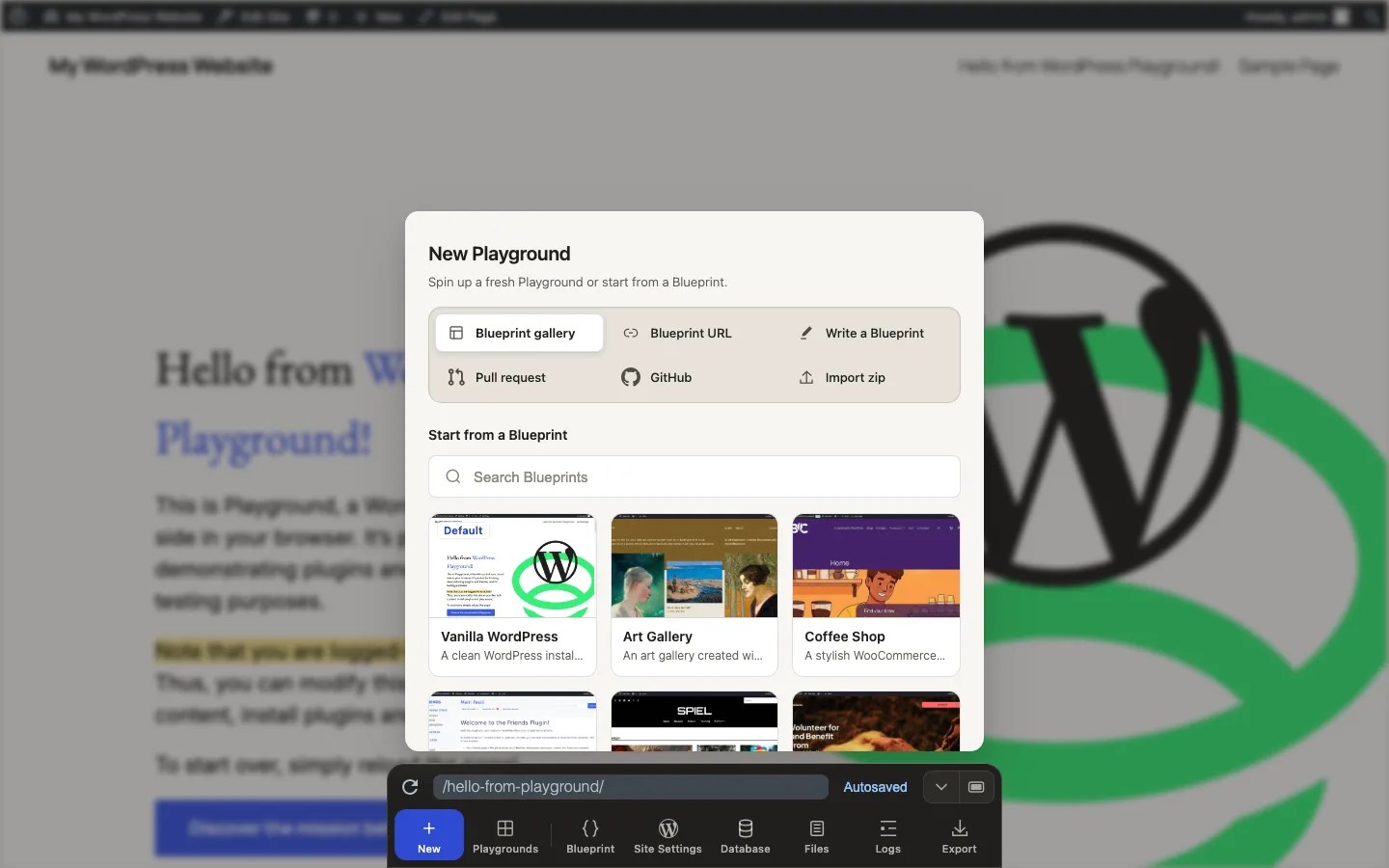
* Open **New Blueprint gallery** in the Playground Dock and choose an example.
* Open **New Blueprint URL** and enter a public Blueprint JSON or ZIP bundle URL.
* Open **New Write a Blueprint** to author a Blueprint in the browser.
* Open **Blueprint** to inspect or edit the current Playground’s Blueprint.
* Pass a Blueprint as a URL fragment.
* Load a Blueprint from a URL using the `blueprint-url` parameter.
* Use Blueprint bundles (ZIP files or directories).
* Use the JavaScript API.
## [URL Fragment](https://developer.wordpress.org/playground/blueprints/using-blueprints/?output_format=md#url-fragment)
The easiest way to start using Blueprints is to paste one into the URL “fragment”
on WordPress Playground website, e.g. `https://playground.wordpress.net/#{"preferredVersions...`.
For example, to create a Playground with specific versions of WordPress and PHP
you would use the following Blueprint:
```language-json
{
"$schema": "https://playground.wordpress.net/blueprint-schema.json",
"preferredVersions": {
"php": "8.3",
"wp": "6.5"
}
}
```
And then you would go to
`https://playground.wordpress.net/#{"preferredVersions":{"
php":"8.3","wp":"6.5"}}`.
In Javascript, you can get a compact version of any blueprint JSON with [`JSON.stringify`](https://developer.mozilla.org/en-US/docs/Web/JavaScript/Reference/Global_Objects/JSON/stringify)
and [`JSON.parse`](https://developer.mozilla.org/en-US/docs/Web/JavaScript/Reference/Global_Objects/JSON/parse)
Example:
```javascript
const blueprintJson = `{
"$schema": "https://playground.wordpress.net/blueprint-schema.json",
"preferredVersions": {
"php": "8.3",
"wp": "6.5"
}
}`;
const minifiedBlueprintJson = JSON.stringify(JSON.parse(blueprintJson)); // {"preferredVersions":{"php":"8.3","wp":"6.5"}}
const encodedBlueprint = encodeURIComponent(minifiedBlueprintJson);
const playgroundUrl = `https://playground.wordpress.net/#${encodedBlueprint}`;
```
You won’t have to paste links to follow along. We’ll use code examples with a “Try
it out” button that will automatically run the examples for you:
[Try it out!](https://playground.wordpress.net/?mode=seamless#eyJwcmVmZXJyZWRWZXJzaW9ucyI6eyJwaHAiOiI4LjMiLCJ3cCI6IjYuNSJ9fQ==)
### [Encoded Blueprint fragments](https://developer.wordpress.org/playground/blueprints/using-blueprints/?output_format=md#encoded-blueprint-fragments)
When you create Playground links from JavaScript or automation tools, encode the
minified JSON once with `encodeURIComponent()` and append it after `#`:
```javascript
const blueprint = {
$schema: 'https://playground.wordpress.net/blueprint-schema.json',
preferredVersions: {
php: '8.3',
wp: '6.5',
},
};
const playgroundUrl = `https://playground.wordpress.net/#${encodeURIComponent(JSON.stringify(blueprint))}`;
```
Playground also supports Base64-encoded Blueprints. Base64 is useful when a platform
modifies JSON fragments or when you want a compact, copyable link. For example,
that’s the above Blueprint in Base64 format: `eyIkc2NoZW1hIjogImh0dHBzOi8vcGxheWdyb3VuZC53b3JkcHJlc3MubmV0L2JsdWVwcmludC1zY2hlbWEuanNvbiIsInByZWZlcnJlZFZlcnNpb25zIjogeyJwaHAiOiAiNy40Iiwid3AiOiAiNi41In19`.
To run it, go to https://playground.wordpress.net/#eyIkc2NoZW1hIjogImh0dHBzOi8vcGxheWdyb3VuZC53b3JkcHJlc3MubmV0L2JsdWVwcmludC1zY2hlbWEuanNvbiIsInByZWZlcnJlZFZlcnNpb25zIjogeyJwaHAiOiAiNy40Iiwid3AiOiAiNi41In19
#### [URIError: URI malformed](https://developer.wordpress.org/playground/blueprints/using-blueprints/?output_format=md#urierror-uri-malformed)
If a Playground link fails with `URIError: URI malformed`, the encoded
Blueprint
fragment is usually malformed. Common causes include an invalid `%` escape, a fragment
that was encoded twice, or JSON pasted into the URL without encoding.
Rebuild the link from the original Blueprint object and encode it once:
```javascript
const playgroundUrl = `https://playground.wordpress.net/#${encodeURIComponent(JSON.stringify(blueprint))}`;
```
If another tool changes URL fragments, use a Base64-encoded Blueprint instead.
In JavaScript, You can get any blueprint JSON in [Base64 format](https://developer.mozilla.org/en-US/docs/Glossary/Base64#javascript_support)
with global function `btoa()`.
Example:
```javascript
const blueprintJson = `{
"$schema": "https://playground.wordpress.net/blueprint-schema.json",
"preferredVersions": {
"php": "8.3",
"wp": "6.5"
}
}`;
const minifiedBlueprintJson = btoa(blueprintJson); // eyIkc2NoZW1hIjogImh0dHBzOi8vcGxheWdyb3VuZC53b3JkcHJlc3MubmV0L2JsdWVwcmludC1zY2hlbWEuanNvbiIsInByZWZlcnJlZFZlcnNpb25zIjogeyJwaHAiOiAiNy40Iiwid3AiOiAiNi41In19
```
### [Load Blueprint from a URL](https://developer.wordpress.org/playground/blueprints/using-blueprints/?output_format=md#load-blueprint-from-a-url)
When your Blueprint gets too wieldy, you can load it via the `?blueprint-url` query
parameter in the URL, like this:
[https://playground.wordpress.net/?blueprint-url=https://raw.githubusercontent.com/adamziel/blueprints/trunk/blueprints/latest-gutenberg/blueprint.json](https://playground.wordpress.net/?blueprint-url=https://raw.githubusercontent.com/adamziel/blueprints/trunk/blueprints/latest-gutenberg/blueprint.json)
Note that the Blueprint must be publicly accessible and served with [the correct `Access-Control-Allow-Origin` header](https://developer.mozilla.org/en-US/docs/Web/HTTP/Reference/Headers/Access-Control-Allow-Origin):
```
Access-Control-Allow-Origin: *
```
When a Blueprint URL fails with `BlueprintFetchError`, check these details:
* The URL must return a JSON file or a Blueprint ZIP bundle, not an HTML page.
* GitHub URLs should use `raw.githubusercontent.com`, not `github.com/.../blob/...`.
* GitLab URLs should use the raw file URL, not a `/-/blob/` page.
* The file must be reachable without login, cookies, VPN access, or a temporary
browser session.
* Draft releases, expired CI artifacts, and temporary tunnel URLs can stop working
even if the Blueprint was valid earlier.
* If you host the file yourself, configure CORS so `https://playground.wordpress.
net` can fetch it.
#### [Blueprint Bundles](https://developer.wordpress.org/playground/blueprints/using-blueprints/?output_format=md#blueprint-bundles)
The `?blueprint-url` parameter now also supports Blueprint bundles in ZIP format.
A Blueprint bundle is a ZIP file that contains a `blueprint.json` file at the root
level, along with any additional resources referenced by the Blueprint.
For example, you can load a Blueprint bundle like this:
[https://playground.wordpress.net/?blueprint-url=https://example.com/my-blueprint-bundle.zip](https://playground.wordpress.net/?blueprint-url=https://example.com/my-blueprint-bundle.zip)
When using a Blueprint bundle, you can reference bundled resources using the `bundled`
resource type:
```language-json
{
"landingPage": "/my-file.txt",
"steps": [
{
"step": "writeFile",
"path": "/wordpress/my-file.txt",
"data": {
"resource": "bundled",
"path": "/bundled-text-file.txt"
}
}
]
}
```
For more information on Blueprint bundles, see the [Blueprint Bundles](https://developer.wordpress.org/playground/blueprints/bundles)
documentation.
## [JavaScript API](https://developer.wordpress.org/playground/blueprints/using-blueprints/?output_format=md#javascript-api)
You can also use Blueprints with the JavaScript API using the `startPlaygroundWeb()`
function from the `@wp-playground/client` package. Here’s a small, self-contained
example you can run on JSFiddle or CodePen:
```html
```
First published
July 15, 2026
Last updated
July 16, 2026
Edit article
[ Improve it on GitHub: Using Blueprints ](https://raw.githubusercontent.com/WordPress/wordpress-playground/trunk/packages/docs/site/docs/blueprints/02-using-blueprints.md)
Changelog
[ See list of changes: Using Blueprints ](https://developer.wordpress.org/playground/blueprints/using-blueprints/?output_format=md#)
[ Previous: Build your first Blueprint](https://developer.wordpress.org/playground/blueprints/tutorial/build-your-first/)
[ Next: Blueprint data format](https://developer.wordpress.org/playground/blueprints/data-format/)